Familiars
Author(s): benevolusgoatTags:
Crash course table of contents
- Creating a mod.
- Creating a passive item.
- Creating an active item.
- Adding to item pools.
- Making costumes.
- Creating a character.
- Creating entities.
- Adding sounds.
- Adding music.
- Making pocket items.
- Creating challenges.
- Structuring your mod.
- Resources.
Familiars are small companions Isaac obtains, normally through passive items, that follow and assist Isaac. This tutorial will cover the basics of creating a familiar that can shoot tears.
Video tutorial⚓︎

Creating your familiar⚓︎
Creating your familiar involves entries within two different files: items.xml and entities2.xml. Adjustments are needed to cater these entries towards familiars specifically.
items.xml⚓︎
When defining your item, instead of the passive tag, use familiar. This will categorize the item as a familiar item. Normally, an item that summons a familiar should have cache="familiars" present, but items that are defined as a familiar item will automatically handle this.
This items.xml entry will add an item named "Friend Frankie", a quality 1 item with four tags present.
babywill have the item contribute to the Conjoined transformation.offensivemakes this item available to Tainted Lost.summonableallows the item to be summoned by Lemegeton.monstermanualallows the item's familiar to be summoned by Monster Manual.
1 2 3 | |
entities2.xml⚓︎
In conjunction with your item, the familiar must exist as an entity. The id variable must be equal to 3 to define it as a familiar.
This entities2.xml entry will add a familiar entity, aptly named "Friend Frankie", with some simple attributes. Note that the items.xml entry and the entities2.xml entry do not need to have the same name; it is only for convenience.
For the variant, it can be any arbitrary value not taken up by an existing vanilla familiar. Available variants are 131-199, 244-899, and 901-4095. You can also omit the variant entirely to have the game auto-assign an available variant.
Auto-assigning variant
If your familiar variant is automatically assigned by omitting it from your entry, and your familiar is the first to load before other mods that do the same, it will be assigned a variant of 0 as there is no vanilla familiar with that variant. When the game attempts to spawn an entity with an invalid variant, it will try to spawn it with a variant of 0. If no entity of that variant exists, the game will crash.
Other mods that may attempt to spawn an invalid familiar will spawn your familiar instead of causing a game crash, which may lead to unwanted bug reports, but there is no technical downside to this method.
1 2 3 4 | |
Familiar relevant tags⚓︎
The tags variable has several options available that are exclusive to or relevant for familiars.
tags list
| Tag-Name | Suffix |
|---|---|
| cansacrifice | Marks familiars that Sacrificial Altar can be used on. |
| fly | Increases familiar size and damage if their player has Hive Mind, similarly to BFFS!. |
| spider | Increases familiar size and damage if their player has Hive Mind, similarly to BFFS!. |
REPENTOGON also has a customtags variable intended to expand upon the tags list.
customtags list
| Tag-Name | Suffix |
|---|---|
| familiarignorebffs | The BFFS! item will no longer affect this familiar. |
| familiarcantakedamage | Familiars with baseHP above 0 will be able to take damage and die, such as from enemy contact, lasers or explosions. Note that they will only take damage from projectiles if they also have the familiarblockprojectiles tag. |
| familiarblockprojectiles | The familiar automatically destroys enemy projectiles on contact. |
| nocharm | Makes the familiar not be charmed by Siren. |
Linking the familiar to the item⚓︎
Although you have created your item and your entity, there is nothing that automatically links the two together. This must be done manually through Lua code through the use of the MC_EVALUATE_CACHE callback.
Firstly, set up the main.lua file at the root of your mod folder, and fetch the necessary variables needed and the callback.
1 2 3 4 5 6 7 8 9 10 11 12 13 14 15 | |
Checking what familiars should spawn, adding familiars, or removing them is all handled through the EntityPlayer:CheckFamiliar function. It is not necessarily required, but is convenient for most use-cases. The function takes the following arguments:
- What familiar variant to spawn.
- How many familiars are expected to be present.
- An RNG object for determining its
InitSeed. - An ItemConfigItem object for linking an item to the spawned familiar. This is necessary for Sacrifical Altar to function properly, but is technically optional.
- An integer to spawn a specific
SubTypeof familiar. This is optional, and by default spawns familiars with a subtype of0.
The familiar variant is already stored earlier in the lua file. For the number of familiars to spawn, this can be any number you'd like, but the most common example is how many copies of the item Isaac has combined with the number of TemporaryEffects of the item. The purpose of the latter is for items such as Box of Friends, where it will add a TemporaryEffect of your familiar item to spawn a copy of your familiar without needing to own the item.
CheckFamiliar and RNG
The RNG object passed into CheckFamiliar is used for the familiar's InitSeed, which is often used by modders as a unique identifier for each individual familiar.
CheckFamiliar is bugged in that it will get new seeds from the RNG object provided without actually changing the object. This means that if you use CheckFamiliar to spawn 3 new familiars at once, they will all have different seeds, but the RNG object will still have the seed it started with. However, if you use CheckFamiliar to spawn one familiar 3 separate times (like Box of Friends), they'll all have the same seed.
A simple way to fix this is to either advance the RNG object manually for each familiar spawned, or to just provide a unique RNG object to CheckFamiliar every time you use it. This tutorial will use the latter solution for simplicity.
1 2 3 4 5 6 7 8 9 10 11 12 13 14 15 16 17 18 19 20 21 22 23 24 25 26 27 28 29 | |
With that, your familiar should now spawn when collecting your item and through other scenarios such as Box of Friends!
Familiar variants⚓︎
Your familiar exists, but at the current moment will do nothing when spawned in. Your familiar can do anything you'd like it to, but there are several definitive types of familiars that you can create with the modding API.

Creating a follower familiar⚓︎
This code will automatically make the familiar a "follower" familiar, being inserted into the familiar line and following the player/the familiar in front of them in line.
1 2 3 4 5 6 7 8 9 10 11 12 13 14 15 16 17 | |
REPENTOGON also allows you to assign the priority of a familiar through MC_GET_FOLLOWER_PRIORITY. With FollowerPriority.SHOOTER, the familiar is further back in the line, but is in front of any other familiars without an assigned priority. It also affects how the familiar is treated for Lilith and Tainted Lilith's Birthright.
1 2 3 4 5 6 7 | |
The rest of this section will focus on creating a simple familiar like Brother Bobby. There is a simple function that will handle the vast majority of work involved: EntityFamiliar:Shoot().
1 2 3 4 5 6 | |
This function, when ran on MC_FAMILIAR_UPDATE, will make your familiar fire regular tears 1.36 times a second dealing 3.5 damage per shot. It will automatically synergize with familiar modifiers such as Baby-Bender, BFFS!, and Forgotten Lullaby, and firing direction overrides like King Baby and Marked.
It will also automatically play certain animations in your familiar's anm2 file. You can view 003.001_brother bobby.anm2 inside the game's extracted resources for reference.
It is possible to modify the firing speed and attributes of the tear. Without REPENTOGON, you will need to some manual checks inside MC_FAMILIAR_UPDATE. This code will alter the fire rate of the familiar so that it fires 1 tear per second, does double the normal damage, and slows enemies.
1 2 3 4 5 6 7 8 9 10 11 12 13 14 15 16 17 18 19 20 21 22 23 24 25 26 27 28 29 30 31 32 33 34 35 36 37 38 39 40 41 42 43 44 | |
If using
REPENTOGON, you can instead use a callback named MC_POST_FAMILIAR_FIRE_PROJECTILE that triggers when EntityFamiliar:Shoot is called and a tear is fired. You can then adjust the properties of the tear. Note that modifications to FireCooldown will still need to be done within MC_FAMILIAR_UPDATE.
1 2 3 4 5 6 7 8 | |
With that, your follower is complete!

Creating an orbital familiar⚓︎
An orbital familiar will orbit around the player, circling around them at a set distance. We will create an orbital similarly to Cube of Meat, which will orbit around the player, block projectiles, and deal damage.
Firstly, you must choose which layer to add your orbital to. This affects its distance from the player, orbiting speed, and its position based on how many familiars are on the same layer.
Orbital layer information
Undefined layers
Familiars will have an orbit layer of -1 by default. An orbital with a layer of -1 or below will stick to the center of the player, while layers at or above 11 will have identical speed and distance as layer 10.
| Layer | Vanilla Familiars | Speed | Distance |
|---|---|---|---|
| 0 | Cube of Meat, Ball of Bandages, Guardian Angel, Pretty Fly, Sacrificial Dagger, Slipped Rib, Smart Fly, Sworn Protector, Spin to Win | 0.045 | X: 25, Y: 20 |
| 1 | Blue Fly | 0.045 | X: 35, Y: 30 |
| 2 | Bot Fly, Distant Admiration | -0.029 | X: 60, Y: 45 |
| 3 | Best Bud, Forever Alone | 0.019 | X: 110, Y: 90 |
| 4 | Angelic Prism, Friend Zone | 0.019 | X: 85, Y: 67.5 |
| 5 | Big Fan, Bloodshot Eye, Guillotine, Leprosy, Mom's Razor, Book of the Dead's bone orbitals | 0.045 | X: 35, Y: 30 |
| 6 | Psy Fly, Tinytoma | 0.029 | X: 50, Y: 42 |
| 7 | Lemegeton Wisps (Layer 1) | 0.039 | X: 28, Y: 21 |
| 8 | Lemegeton Wisps (Layer 2) | -0.029 | c |
| 9 | Lemegeton Wisps (Layer 3) | 0.019 | X: 64, Y: 50 |
| 10 | Swarm Fly | 0.019 | X: 40, Y: 36 |
Speed determines how fast the orbital revolves each game tick, as well as the direction. A negative speed will cause the orbital to move clockwise, with a positive speed moving counter-clockwise.
Distance is determined by a Vector, where X is the widest left/right point and Y is the lengthiest up/down point of the orbit. Below is a visualization using Angelic Prism:
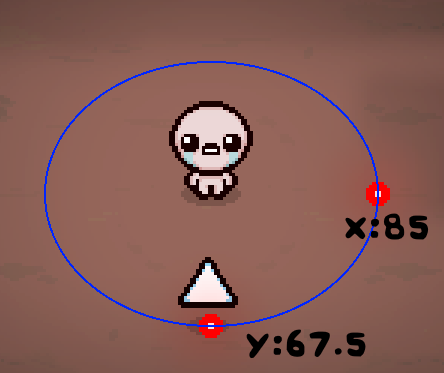
These attributes will be automatically applied to the orbital when using EntityFamiliar:AddToLayer, so there is no need to set those yourself.
1 2 3 4 5 6 7 8 | |
Now that the familiar is registered as an orbital, it needs to follow its expected orbital position. EntityFamiliar:GetOrbitPosition will return the expected orbit position of the familiar, but the position should be translated into velocity as to not have snappy movement.
1 2 3 4 5 6 7 8 9 10 | |
Next, contact damage. This is trivial to create, as you just need your entities2.xml file. In your familiar entry, you can update collisionDamage and collisionInterval for how much damage the familiar deals and how often it deals it. collisionDamage="7" and collisionInterval="4" are the exact values that Cube of Meat uses.
1 2 3 4 | |
For blocking projectiles, there are different methods depending on usage of REPENTOGON.
With
REPENTOGON, create a customtags variable and add familiarblockprojectiles.
1 2 3 4 | |
Without REPENTOGON, you will need to detect projectiles on collision and destroy them there. Use MC_PRE_FAMILIAR_COLLISION to accomplish this, and Entity:Die to kill the projectile.
1 2 3 4 5 6 7 8 9 | |
With that, your orbital is finished!

Creating a delayed familiar⚓︎
Delayed familiars are familiars that follow the player's exact movements on a specific delay.
Adding one can be done in two steps.
- Call EntityFamiliar:AddToDelayed on
MC_FAMILIAR_INIT. - Call EntityFamiliar:MoveDelayed on
MC_FAMILIAR_UPDATEwith the number of game frames the movement should be delayed by relative to its parent. The first familiar will delay its movements relative to the player's movements, while extra familiars will delay it relative to the last familiar's movements.
1 2 3 4 5 6 7 8 9 10 11 12 13 14 15 16 17 18 | |